


Phone calls remain one of the most valuable conversion types for businesses across industries. Without proper tracking, you’re unable to measure which ads generate phone leads and waste budget on non-performing campaigns.
Mastering tracking phone conversions from Google Ads requires essential steps like enabling call reporting in your account, creating phone call conversion actions, using Google Forwarding Numbers on your website, and implementing third-party tracking tools.
You’ll discover how to capture calls from ads directly, track calls from your website, and integrate multiple platforms for comprehensive insights. By the end, you’ll have a fully functional system that attributes every phone lead to the right campaign, keyword, and ad.
Setting Up Phone Call Conversions in Google Ads
Before analyzing call performance, you must establish the foundation correctly. Proper setup ensures every call is accurately captured and attributed to the right marketing effort.
Enable Call Reporting in Your Account
Call reporting is your first critical step in establishing Google Ads conversion tracking. Navigate to Tools and Settings > Account Settings in Google Ads and locate the Call Reporting section. Toggle it on and confirm your business phone number is eligible for Google Forwarding Numbers.
These dynamically generated numbers replace your actual business number for ad-driven traffic, allowing Google to track calls back to specific campaigns and keywords. This is the cornerstone of accurate phone conversion measurement across your entire account.
Create a Phone Call Conversion Action
Creating a conversion action tells Google Ads what counts as a valuable call. Access Goals > Conversions > Summary and click New Conversion Action. Select Phone calls and choose between calls from ads or calls to a number on your website.
Next, configure your settings by assigning a conversion name like Website Phone Lead and establishing a minimum call duration threshold, typically between 30 and 90 seconds. This configuration directly impacts your Google Ads conversion setup accuracy and call quality filtering.
Link Conversion Actions to Ads and Extensions
Once your conversion action exists, associate it with specific call extensions or call-only ads. Ensure all ads use phone numbers eligible for Google Forwarding Numbers. Consider leveraging a Google Tag Manager expert to streamline code management and conversion firing conditions.
Linking conversions directly to ads reveals which campaigns, keywords, and ad variations generate the most valuable calls. This enables precise bid adjustments and strategic budget allocation.
Tracking Calls Directly from Ads
Users who click a call button in your ad and initiate a phone call without visiting your website require a specific tracking approach.
Using Call Extensions and Call-Only Ads
Call extensions appear directly beneath your search ads, displaying a clickable phone number. Call-only ads are designed exclusively for mobile users and show only the business name, rating, and phone number. Create call extensions under your campaign or ad group settings, ensuring the phone number is eligible for Google Forwarding Numbers.
Call-only ads are particularly effective for local services, emergency services, and businesses where immediate phone contact is preferred. This method captures pure phone conversions from Google Ads without website visits.
Setting Call Duration Thresholds
Not every call represents a qualified lead. A short 5-second call might be an accidental click, while a 2-minute conversation signals genuine interest. Establish a minimum call duration threshold aligned with your sales process.
Service companies might require 90-plus seconds, while quick appointment bookings could succeed in 30 seconds. This filtering mechanism ensures your Google ads call conversion tracking reports only meaningful interactions.
Testing and Verifying Conversions
After setup, test everything before launching. Click your live ad on a mobile device, call the number, and verify the conversion appears in Google Ads within 24 hours. Check the Conversions menu for recent activity.
If conversions don’t register, troubleshoot by verifying your Google Forwarding Number is active and your configuration is correct. Use GA4 server-side implementation principles to diagnose firing issues if needed.
Tracking Calls from Your Website
Many valuable calls originate from users who visit your site after clicking an ad. Proper website tracking requires dynamic number insertion and precise tag implementation.
Using Google Forwarding Numbers on Your Website
Google Forwarding Numbers dynamically replace your static business number on pages visited by ad-driven traffic. This capability allows Google to track which specific ad, campaign, or keyword drove each website visitor. When the visitor calls, Google attributes that conversion to the source ad.
Restrict these dynamic numbers to pages visible only to ad-driven traffic. Avoid displaying them on organic search results or direct traffic pages, as this creates attribution confusion.
Installing Global Site Tags and Phone Snippets
Add Google’s global site tag to every page of your website. Then add the phone snippet code to pages displaying your business number. This combination enables dynamic number insertion and call conversion tracking.
Use a Google Tag Manager expert to simplify code deployment, manage firing conditions, and reduce technical errors. Proper installation ensures your Google Ads analytics conversion tracking captures every website-originated call accurately.
Monitoring and Optimizing Website Call Conversions
After implementation, monitor performance continuously by accessing Google Ads to review call duration, source campaigns, and conversion rates. Identify which keywords and ads generate the longest calls, as these likely represent higher-quality leads.
Integrate UTM parameter tracking alongside conversion data to understand the full customer journey. Use GA4 analytics expert guidance to analyze call patterns, peak calling hours, and repeat caller rates for strategic optimization.
Advanced Phone Conversion Tracking Options

Businesses requiring granular insights and multi-platform coordination benefit from advanced tracking solutions and comprehensive measurement strategies.
Third-Party Call Tracking Tools
Platforms like CallRail and CallTrackingMetrics provide call recordings for quality assurance, lead scoring based on call behavior, CRM integration for automatic logging, and offline conversion imports. These tools complement Facebook Pixel integration, enabling you to track calls across paid social channels.
Similarly, coordinate with TikTok conversion tracking, Snapchat ads tracking, and Pinterest conversion setup to understand which channels drive phone leads. LinkedIn tag implementation helps B2B companies track enterprise call conversions from professional networks.
Tracking Offline Conversions
Not all valuable outcomes occur online. Capture the Google Click ID (GCLID) in your CRM during initial call intake. When a call converts to an offline sale, like a contract signed or service booked, manually import that offline conversion back into Google Ads.
This approach gives credit to the original ad and improves future targeting and bid strategies. Coordinate this with Microsoft Ads conversion tracking and Shopify Google Ads conversion setup if you operate on multiple platforms.
Optimizing Ads Using Call Data
Call conversion data reveals optimization opportunities for campaign improvement. If certain keywords generate calls with longer average duration, increase bids for those keywords. If call-only ads outperform search ads on mobile, allocate more budget accordingly.
Use Facebook Pixel and Conversion API principles by tracking not just whether a call occurred, but when in the customer journey it happened. Integrate insights with GA4 server-side implementation for attribution accuracy across all touchpoints.
Call Conversion Performance Benchmark
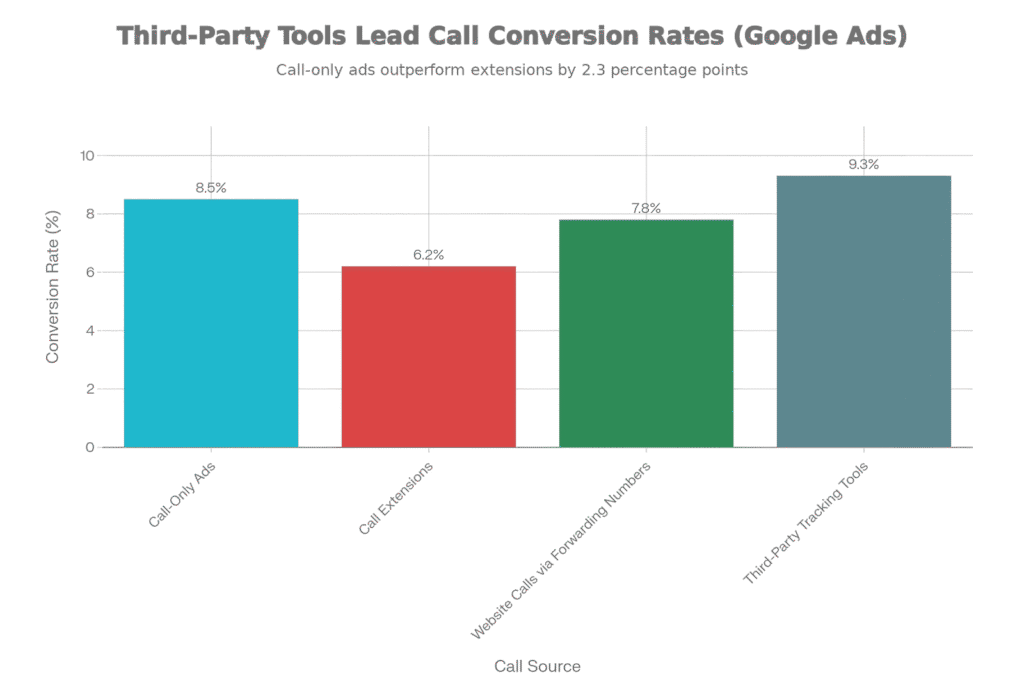
Average Call Conversion Rates by Call Source in Google Ads
| Call Source | Conversion Rate | Average Call Duration | Best For |
| Call-Only Ads | 8.5% | 2 min 15 sec | Mobile-first campaigns |
| Call Extensions | 6.2% | 1 min 45 sec | Search ads supplementation |
| Website Forwarding Numbers | 7.8% | 2 min 30 sec | Lead quality tracking |
| Third-Party Tools | 9.3% | 2 min 50 sec | Enterprise campaigns |
Common Mistakes and Best Practices
Avoiding tracking errors and aligning systems with business goals ensures accurate data and effective optimization throughout your campaigns.
Avoiding Incorrect Setup
Missing global site tags prevents website call tracking entirely. Incomplete phone snippets cause dynamic numbers to fail on certain pages. Duplicate conversion actions inflate conversion counts and distort reporting.
Expert Google Analytics 4 consulting to audit your current setup, identify gaps, and implement corrections. A proper audit typically reveals 2 to 3 critical configuration issues requiring immediate attention.
Aligning Call Tracking with Business Goals
Define whether calls are your primary conversion triggering bid adjustments or a secondary metric tracked for insight. Service businesses often make calls primary, while ecommerce companies might treat them as secondary. Set realistic call duration thresholds reflecting your actual sales process.
Partner with a Facebook Pixel integration specialist if tracking cross-channel call-driven sales. Ensure your model aligns with your Google ads conversion setup guide requirements for your specific business type.
Ensuring Privacy Compliance
Implement Google Consent Mode to respect user privacy preferences across EU, California, and other regulated regions. Ensure call tracking respects GDPR and CCPA regulations regarding data collection and storage.
Keep call recordings compliant with state and federal wiretapping laws as some jurisdictions require two-party consent. Your Google Tag Manager expert should review all tracking implementations for privacy-first design.
Frequently Asked Questions
How long does it take to see phone conversion data in Google Ads?
Phone conversions typically appear in Google Ads within 24 hours of the call. Full historical data may take several days to populate. Initial setup usually requires 1 to 2 weeks to generate sufficient data for meaningful analysis.
Can I track phone conversions from multiple phone numbers?
Yes, you can create separate conversion actions for different phone numbers like sales, support, or appointments. This granularity helps identify which department or line generates the most calls. Assign different conversion values based on line type if desired.
What is the difference between call-only ads and call extensions?
Call-only ads are mobile-exclusive and show only business information and a phone button without a landing page. Call extensions appear beneath search ads and allow users to click the phone number while the ad remains visible. Use call-only ads when calls are your primary goal.
How do I track calls that result in offline sales?
Capture the Google Click ID (GCLID) during the initial call and store it in your CRM. When the call converts offline, manually import the conversion using Google Ads’ Offline Conversions feature. This gives credit to the original ad and improves future optimization.
Transform Phone Conversion Tracking for Maximum ROI
Phone conversion tracking transforms Google Ads from guesswork into precision measurement. From enabling call reporting and creating conversion actions to implementing dynamic forwarding numbers and third-party tools, each component plays a critical role in accurate measurement.
Follow this setup guide, test thoroughly before going live, and continuously monitor performance data. Adjust call duration thresholds, optimize bids based on call quality, and integrate offline conversions for complete attribution.
Your competitors may still ignore phone calls, but with proper tracking, you’ll capture every lead and systematically improve campaign performance.
